Published May 05, 2026
Last Updated May 05, 2026
A Data-Driven Blog Content Creation Process for Beginners
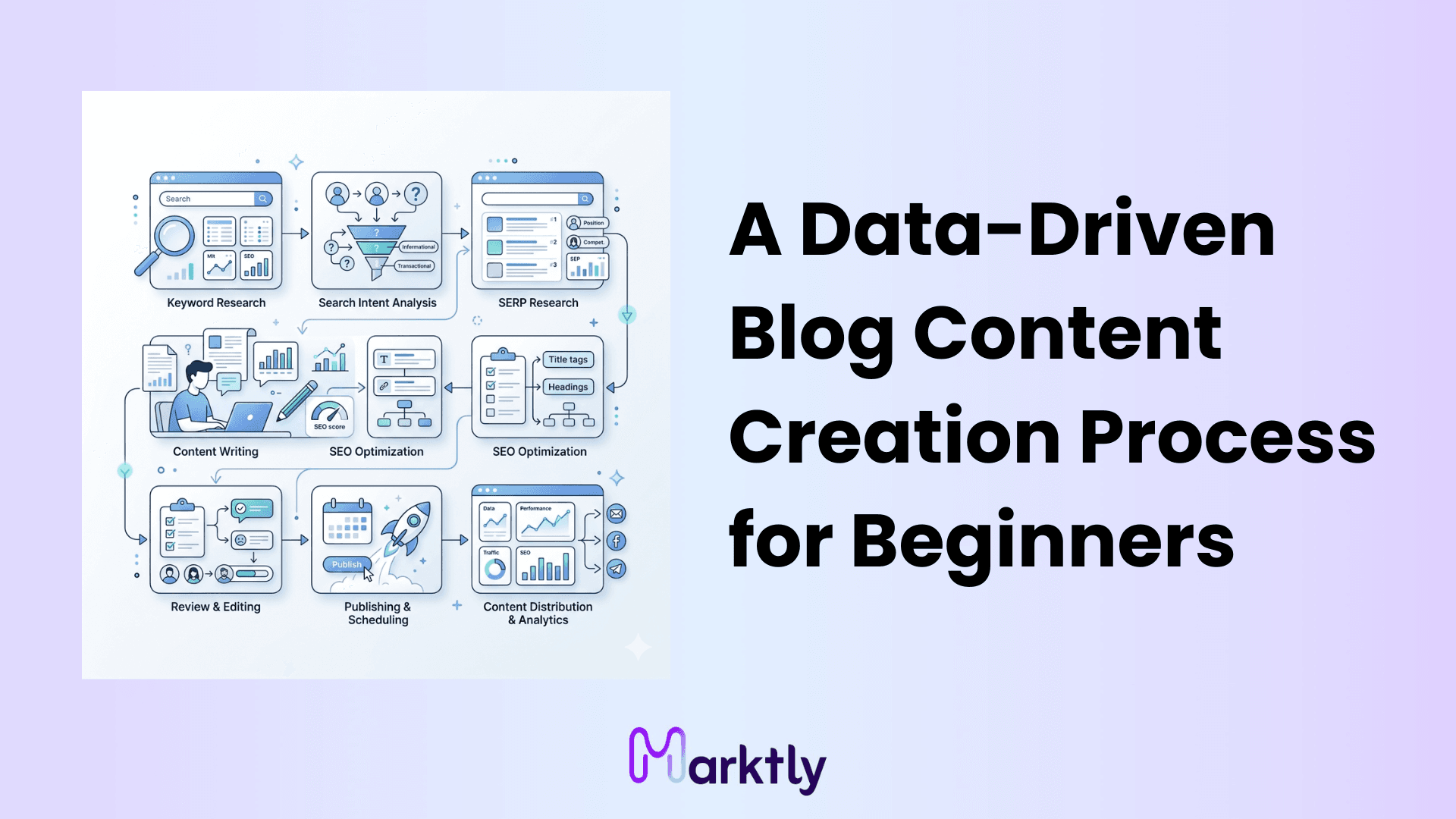
There are over 600 million active blogs on the internet right now. Most of them are invisible. Not because the writing is bad but because nobody validated why they were writing in the first place. Publishing without data is just shouting into a room with no doors.
Here's the honest truth: blogging that drives traffic isn't about passion or consistency. It's about matching what you write to what people are actually searching for. Hobbyist blogs write for themselves. SEO-engineered content is written for a specific person, at a specific moment, looking for a specific answer.
This guide gives you a repeatable, step-by-step workflow to build blog posts that search engines can process and readers actually finish. We'll cover intent validation, SERP-based outlining, AI-assisted drafting, on-page SEO, and content distribution using a clean human-AI handoff so your content sounds like a person wrote it, not a machine.
Validate Search Intent and Keyword Viability
Before you write a single word, you need to know if the topic is worth your time. Targeted keyword research isn't about finding what you want to write about. It's about confirming someone is actually looking for it.
Start with volume and difficulty. For a new domain (under 6 months old, minimal backlinks), keep keyword difficulty below 30. Tools like Ahrefs, Semrush, or even free tools like Ubersuggest give you this number directly. If a keyword has decent volume but difficulty above 50, skip it because newer sites are unlikely to rank against established competitors. You won't rank because high difficulty keywords require strong domain authority, and you'll waste weeks producing content that never surfaces.
Once you have a viable keyword, categorize it by intent. Every search query falls into one of four buckets:
- Informational "how to write a blog post" (they want to learn)
- Navigational "HubSpot blog templates" (they want a specific brand/page)
- Commercial "best blog tools for beginners" (they're comparing options)
- Transactional "buy content writing software" (they're ready to act)
This matters because intent determines format. Writing a product comparison when someone wants a tutorial is a fast way to get a 90% bounce rate.
Now open the top 3 results for your keyword and look at the dominant content format. Is it a listicle? A how-to guide? A long-form pillar? Google has already tested user behavior, and the top-ranking results indicate which content formats generate the most engagement. Use that data, not your gut.
One more filter: if every page-one result is from high-authority sites like Forbes or HubSpot, move on because their backlink profiles make them difficult to outrank. Protect your time by choosing lower-competition keywords where your content has a realistic chance to rank.
Architect the Content Outline via SERP Reverse-Engineering
You wouldn't build a house without a blueprint. Yet most writers open a doc and just... start typing. The blank page problem isn't a creativity problem. It's a structural problem.
Here's how to fix it. Pull up the top 3–5 ranking posts for your keyword and extract their H2 and H3 headings. Write them all down in a spreadsheet or doc. This gives you the baseline blog post outline the minimum coverage your content needs to be taken seriously by Google. Think of it as structural parity.
But parity alone won't get you ranked above the people you just copied the structure from. You need to go further. Read those posts and ask: what did they miss? Look for thin sections, unanswered questions, outdated stats, or concepts mentioned but never explained. That gap is your Information Gain, the thing you add that nobody else does. It's the primary differentiator between "this ranks" and "this doesn't."
Now organize the outline using the inverted pyramid method. Critical definitions go first. Supporting context comes after. Nice-to-know details go last. This isn't academic writing; readers make a decision to stay or leave in the first 10 seconds. Give them the most important thing immediately.
Finally, pull up the "People Also Ask" box for your target keyword. Those questions are real, live search demand Google is showing you for free. Convert the most relevant ones directly into H3 subheadings. This captures long-tail traffic without needing a separate article, and it signals to Google that your content covers the full topic, not just the surface.
Execute the AI-Assisted Drafting Protocol
AI is a drafting tool. It's not a thinking tool.
Use an AI content generator for what it's actually good at: building structural scaffolding, extracting basic factual points, and writing transitions. Do not let it write your conclusions, your insights, or your recommendations. That's where it produces the flat, lifeless content Reddit writers complain about and it's what Google's helpful content updates are designed to detect.
The human-in-the-loop protocol is simple: AI handles the mechanical, you handle the meaningful.
Inject original insights by adding things AI literally cannot access. These aren't optional; examples include original test results, client stories, primary-source statistics, or informed opinions. These are what make your post different from the 47 other articles ranking for the same term.
Now a quick formatting rule that makes a measurable difference: keep paragraphs to a maximum of three sentences. Not as a style preference as a UX constraint. Over 60% of web traffic is mobile (Statcounter Global Stats). Dense paragraphs on a phone screen are cognitively exhausting. Short paragraphs get read. Long ones get skipped.
AI Drafting Checklist:
- AI used only for structure, transitions, and factual extraction
- Proprietary data or original insight added in every major section
- No paragraph exceeds three sentences
- Dense operational steps converted to numbered lists
- No AI-generated generalizations left unreplaced
Use numbered lists when the order matters (steps). Use bullet lists when it doesn't (options, attributes). The goal is immediate cognitive processing the reader should be able to skim and still get 80% of the value.
Implement On-Page SEO and Content Validation
A good draft is just a raw asset because search engines require structured signals to properly interpret and rank it.
Start with keyword placement. Your primary keyword must appear in three non-negotiable places: the H1 heading, the URL slug, and within the first 100 words of the article. These are crawl signals, such as keyword placement in the H1, URL slug, and first 100 words. Google uses them to categorize the page before it reads the rest. Vague or delayed keyword placement is one of the most common reasons well-written posts underperform in search engine rankings.
Next, validate semantic richness. This is less about keyword frequency and more about topical coverage. Run your draft against a tool like Surfer SEO or Clearscope and check which NLP entities (related terms, concepts, entities) are present versus missing. Semantic coverage matters more than keyword density in 2024 Google's language models understand context, not just repetition. A post about "email marketing" should naturally include terms like open rate, segmentation, automation, and subscriber list.
Internal linking is non-negotiable if you're building a content cluster. Every new post should connect to at least 2–3 existing pages on your site that are topically related. This distributes authority and tells search engines how your content is organized. Isolated posts with no internal links in or out consistently underperform, even with strong keyword targeting.
Finally, audit your external links. Cite reputable sources (think: published studies, official documentation, industry reports). Link to high-authority, non-competitor domains. Outbound link hygiene directly impacts E-E-A-T (Experience, Expertise, Authoritativeness, Trustworthiness) Google's framework for evaluating content credibility.
Do I Need a Content Style Guide?
If you're the only writer publishing twice a month, you likely don't need a style guide yet because consistency is easier to maintain at low volume. But the moment you bring in a second writer, start outsourcing, or use AI to produce multiple posts a week, a style guide becomes essential.
A documented style guide formalizes your brand voice (formal vs. conversational), formatting rules (how you use headers, lists, callouts), and visual preferences (image style, screenshot standards). Without it, posts start to feel inconsistent and readers notice, even if they can't name exactly why.
For AI-assisted workflows specifically: build a prompt template that includes your tone, your audience, and 2–3 example sentences written in your style. Lock that template in. It prevents manual recalibration every time you start a new post and ensures the output aligns with your brand from the first draft.
Repurpose Content via the Remix Protocol
You spent three hours writing a post. Now why do you also spend three hours rewriting it into 12 different formats? No. That's how content burnout happens.
The Remix Protocol works differently. Instead of rewriting the article, you extract. Pull the core premise, the single most contrarian or useful claim in the post and one specific example that proves it. That's your repurposing raw material for the week.
Here's how to format it by platform:
- LinkedIn: Rewrite the core premise as a tight, opinionated statement (not a link dump). Something like "Most bloggers skip this step and wonder why nothing ranks." Native posts get 3–5x the organic reach of link-based posts on LinkedIn. Write the value in the post, not behind a URL.
- X (Twitter): Take 3–5 sub-points from the article and build a thread. The first tweet is the hook. Each tweet after that is one actionable point. The last tweet links back to the full article.
- Email newsletter: Use the introduction of your blog post almost verbatim as the email body, then link to the full article for those who want to go deeper.
One more thing: don't distribute in real-time. Batch your social media content at the end of the week. Write all your LinkedIn posts on Friday, schedule them for the following week. This separates creative tasks (writing) from mechanical tasks (formatting, scheduling) and eliminates the context-switching friction that kills momentum mid-week.
A simple content calendar, even a spreadsheet is enough to manage this.
Start With One Post, Not a Strategy
Here's what I'd actually recommend: don't try to build the full system at once. Pick one keyword you can realistically rank for. Validate the intent. Build the outline from the SERP. Draft it with AI doing the scaffolding and you doing the insight. Run through the SEO checklist before you publish. Then remix it into two social posts.
That's one complete cycle. Do it five times and you'll understand the process better than any course can teach you.
The tools, templates, and scale come later. The workflow is what you build first.
Read More Articles


Ready to create content with Marktly?
Start publishing smarter with AI-powered content workflows and seamless CMS integrations. Everything you need to go live