Last Updated Apr 16, 2026
Diagnosing Organic Traffic Loss: URL Isolation and Root Cause Analysis
Traffic drops feel scary. But diagnosing organic traffic loss is not guesswork; it’s a structured data evaluation process because every drop is tied to measurable changes in search performance.
Not every drop is SEO-related. A decline can come from a tracking failure, a visibility shift, or an actual ranking loss, and each requires a completely different fix.
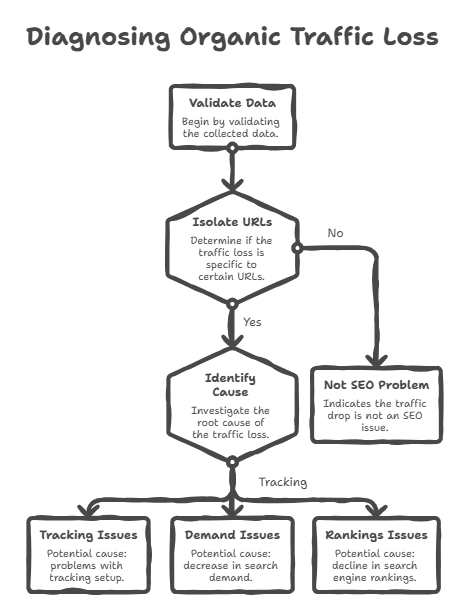
This guide follows a strict workflow. First, verify your data. Then isolate the exact URLs losing traffic. Finally, map the issue to a real cause technical, algorithmic, or SERP-driven.
Before analyzing search engine behavior, validate the integrity of the data reporting.
Verify Tracking and Data Integrity
Start here because incorrect data leads to incorrect decisions.
Compare Google Analytics 4 (GA4) organic sessions with Google Search Console (GSC) clicks because both should show aligned trends even if the numbers differ. A mismatch signals a reporting issue, not an SEO problem.
A scenario where GA4 sessions drop to zero while GSC clicks remain stable indicates a tracking failure, usually caused by broken tags or incorrect deployment in Google Tag Manager.
Don’t forget timing because seasonal demand affects search behavior. Calculate year-over-year (YoY) performance using the same 28-day period to confirm whether the drop is real or seasonal for example, travel-related queries often decline after peak holiday months.
Checklist to validate data integrity:
- GA4 and GSC trends aligned
- No recent tracking or tag changes
- YoY comparison confirms decline
- GA4 drop without GSC drop → tracking issue
- Gradual decline across both → valid SEO signal
Once tracking integrity is confirmed, the aggregate traffic drop must be broken down to the URL level.
Isolate Affected URLs in Search Console
Move from site-level data to page-level data because traffic loss is rarely uniform across all URLs.
- Navigate to the GSC Performance report and activate the Compare feature using a 28-day period before the decline because this creates a controlled baseline for comparison.
- Switch to the Pages tab and sort by Clicks Difference in ascending order because absolute click loss highlights business impact more accurately than percentage change.
- Export the data into a spreadsheet because working outside GSC allows structured analysis and tracking of affected URLs.
Not all pages drop equally for example, blog articles targeting informational queries may decline while high-intent landing pages remain stable.
With the failing URLs isolated, metric analysis determines the exact mechanical failure.
Did Rankings, Impressions, or CTR Drop?
What actually dropped first? This question determines the entire diagnosis because each metric reflects a different failure type.
Evaluate three metrics for each affected URL:
- Average Position
- Impressions
- CTR (Click-through rate)
| Scenario | What Dropped | What It Means | Next Step |
|---|---|---|---|
| Position ↓ + Impressions ↓ | Rankings | Loss of visibility due to algorithmic or technical issues | Audit technical + updates |
| Impressions ↓, Position stable | Demand | Reduced search volume or intent shift | Reassess keyword intent |
| CTR ↓, Position & Impressions stable | Visibility | SERP features absorbing clicks | Optimize snippet |
A simultaneous drop in position and impressions indicates ranking loss because reduced visibility leads to fewer impressions.
A drop in impressions with a stable position indicates demand contraction because fewer users are searching for that query.
A drop in CTR with stable rankings and impressions indicates SERP displacement because features like AI Overviews or featured snippets capture clicks before users reach your result.
Sometimes SEO performance remains stable, but SERP layout changes reduce clicks because users get answers directly on the results page.
If metrics indicate a direct ranking loss, the investigation shifts to sitewide technical health and algorithmic timelines.
Diagnose Algorithmic and Structural Failures
This stage identifies whether the issue comes from search engine evaluation or site-level technical problems.
Cross-reference the traffic decline date with Google’s Search Status Dashboard because alignment with Core or Spam updates indicates algorithmic re-evaluation.
Trigger: Traffic drop aligns with update → Algorithmic impact
Evaluate the GSC Page Indexing report because spikes in excluded pages, 404 errors, or noindex tags indicate crawl or indexing failures often caused by recent deployments.
Trigger: Indexing errors increase → Technical issue
Inspect keyword cannibalization because multiple pages targeting the same query split authority and reduce ranking stability.
Trigger: Ranking fluctuations across URLs → Cannibalization
Sudden drops affecting many URLs usually indicate systemic issues such as algorithm updates or technical errors.
Gradual declines affecting specific pages indicate localized issues rather than sitewide penalties.
Conversely, a gradual decline isolated to specific URLs points to content decay and competitor displacement rather than a systemic penalty.
Identify Content Decay and Competitor Displacement
This is a gradual decline caused by outdated content and stronger competitor pages.
Assess each affected URL by comparing it with the top three ranking pages because search engines reward pages with higher relevance and depth. For example, competitors may include updated statistics, better structure, or new subtopics.
Extract competitor headings and entities because they reveal missing information that search engines now prioritize.
Adding more words without improving information gain doesn’t work because rankings depend on relevance and completeness, not length.
Execute a structured content refresh by:
- Adding missing entities
- Resolving intent mismatches
- Improving clarity and structure
Then submit the URL in GSC via the URL Inspection tool for faster recrawling.
Conclusion
Traffic drops follow identifiable patterns because they are driven by measurable changes in rankings, demand, or visibility.
You learned how to verify your data integrity.
You learned how to isolate the exact URLs causing the drop.
You learned how to diagnose whether the issue is rankings, demand, or CTR.
You learned how to identify technical, algorithmic, or content-related causes.
Skipping steps turns the process into guesswork. Following a structured workflow leads to accurate diagnosis.
Start with GSC. Run the comparison report. Export affected URLs. Identify which metric dropped first. Then follow the correct path technical, algorithmic, or content.
If you get stuck, pause and recheck the data because confusion usually signals a missed diagnostic step.
Take it step by step. The data will tell you what’s wrong.
Read More Articles



Ready to create content with Marktly?
Start publishing smarter with AI-powered content workflows and seamless CMS integrations. Everything you need to go live