Published May 21, 2026
Last Updated May 21, 2026
When to Update vs. Delete Old Blog Posts: A Data-Driven SEO Framework
Content decay is not bad luck. It is close to a mathematical certainty: old SEO assets lose impression share when search intent shifts, the index gets crowded, competitors update faster, or Google starts favoring fresher, clearer answers.
The fix is not to “update everything.” That is how teams waste weeks polishing pages that should have been merged or deleted. You need a content audit process that identifies whether a URL should be refreshed, rewritten, consolidated into another page, or removed.
Here is the simple protocol: audit performance data, check backlink equity, classify the right action, and then execute the right technical route. Google Search Console already gives you the core page, query, CTR, click, impression, and average-position data you need to start this work.
Audit Content Decay Metrics
Start with Google Search Console, not a hunch. A blog post may appear outdated while still maintaining search value, whereas another page may steadily lose organic clicks despite no visible quality issues.
Compare each URL’s click data from the last 6 to 12 months against the previous matching period. Use the Pages tab to isolate URL-level performance, then open the Queries tab to see which searches changed. Search Console lets you change date ranges, review clicks, impressions, CTR, and average position, and group data by pages or queries.
A page becomes a real content decay candidate when the drop is big enough to matter and stable enough to trust. Do not panic over one bad week. Traffic changes may result from seasonal demand shifts, paid advertising campaigns, news events, or holiday periods.
Use this filter:
- Traffic decline: The URL has lost 20% or more organic clicks across a 6-to-12-month comparison.
- No clear seasonality: The drop does not match the same dip from last year or a known low-demand period.
- Ranking slip: The main query moved from positions 1–3 to 4–10, which often hurts CTR because the page lost top visibility.
- Opportunity range: The page ranks between 4–20 for valuable queries, so a refresh may still move it.
- Intent mismatch: The current ranking pages target a different user goal, such as product comparisons instead of informational guidance.
- Backlink equity: The page has external links that may be worth preserving before you delete, merge, or redirect it.
The backlink check is not optional. A low-traffic page may still contain valuable backlink equity, so deleting it without reviewing inbound links can remove ranking signals. Export referring domains from your backlink tool. Then classify each link by topic relevance and identify why the source linked to the page, such as for a statistic, quote, template, or guide.
Once you have the list, the real question changes. It is no longer “Which old posts look weak?” It becomes “Which action gives this URL the cleanest next life?”
The Content Lifecycle Decision Matrix
Evaluate each audited URL using predefined decision criteria. The goal is to assign one action: Refresh, Rewrite, Consolidate, or Prune. This creates a consistent decision-making framework across the audit process .
Use this rule set:
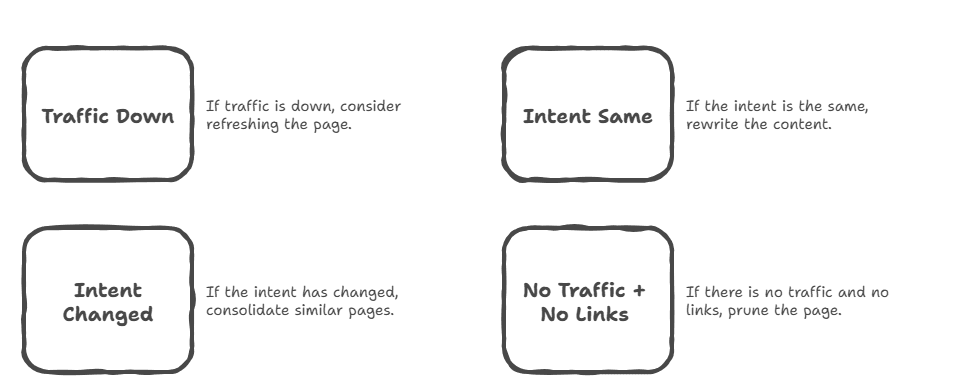
- Refresh the URL when it still ranks in positions 4–20, the search intent is mostly the same, and the page needs fresher examples, updated statistics, better internal links, stronger headings, and cleaner semantic coverage. This situation usually means the page structure is still valuable, but the information is outdated.
- Rewrite the URL when it has fallen beyond position 50, or when the SERP intent has fully changed. For example, maybe your old informational guide now competes against comparison pages, pricing pages, tool lists, or transactional listicles. Minor edits will not resolve the ranking issue because the page no longer matches current search intent.
- Consolidate URLs when two or more posts compete for the same keyword set. Pick the URL with the strongest backlink equity, best rankings, and cleanest intent match as the primary asset. Then transfer unique data, sections, examples, and backlinks from weaker pages into the primary URL. This turns scattered signals into one stronger page.
- Prune the URL when it has zero meaningful traffic, thin content, no external backlinks, no conversions, and no clear role in your current topic map. This is the only safe “delete” bucket. If the page has no users, no links, no topical value, and no business use, keeping it may only add crawl noise.
Here is the part people often get wrong: backlinks should change the action. A zero-traffic page with strong links is not a simple delete. It is usually a consolidation candidate. Google confirms that properly implemented 301 redirects can transfer ranking signals and backlink equity to a new URL.
Search intent should also change the action. If the query used to mean “how to do X” but now means “best X software,” your old guide is not just outdated. It is misaligned. Although the shift can reduce rankings, it helps identify that the page type no longer matches search demand.
A practical formula looks like this:
Traffic trend + backlink equity + intent fit = lifecycle action.
If traffic is down but intent still fits, refresh. If traffic is down and intent changed, rewrite. If multiple URLs split the same intent, consolidate. If the page has no traffic, no links, and no topical role, prune.
That simple rule saves a lot of debate.
Execute a Semantic Content Refresh
A content refresh requires meaningful updates beyond changing the publication date or adding a short section. Google specifically warns against updating timestamps without meaningful content improvements.
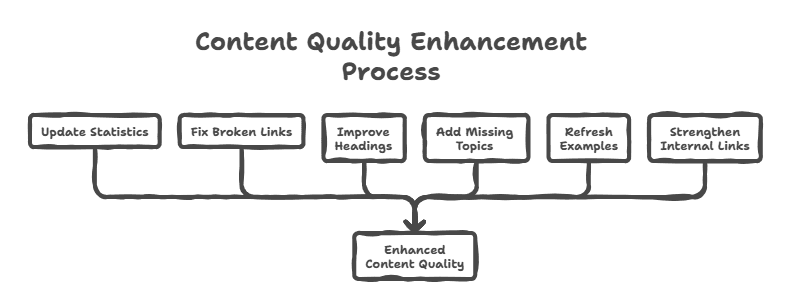
Use this workflow:
- Validate the current SERP.
Search the primary keyword and compare the top results against your page. Look for missing entities, new subtopics, changed examples, stronger definitions, and questions your post does not answer. The goal is to identify missing information and evolving search expectations. - Extract missing semantic terms.
Add semantically related terms and entities that improve topical completeness. For a content audit page, that might include Google Search Console, GA4, crawl budget, 301 redirect, 404, 410, keyword cannibalization, search intent, internal linking, backlink equity, and E-E-A-T. Add these terms only when they improve topical clarity and completeness. - Replace outdated facts.
Remove old stats, dead outbound links, broken screenshots, expired tool names, and examples that no longer match the industry. This protects trust. Google’s own guidance says its systems look for signals tied to experience, expertise, authoritativeness, and trustworthiness, with trust being the most important part of E-E-A-T. - Add atomic paragraphs.
Write new sections in short, self-contained blocks of two or three sentences. Each block should answer a specific question, such as defining a redirect type or explaining keyword cannibalization. This helps readers skim and makes the content easier for AI systems and answer engines to extract. - Format for AI and normal search.
Google explains that AI Overviews use the same core search eligibility systems as traditional Search, and there are no special extra technical requirements or special schema needed just to appear in those AI features. Content should use crawlable HTML text, descriptive internal links, and clear topic coverage. - Update the meta title and H1.
Make the title more accurate, current, and specific. Your title tag still strongly influences CTR because it shapes how users evaluate the result in search, so a vague or stale title can hurt performance before the reader even sees the page. - Update the timestamp only after real changes.
If you changed structure, facts, examples, internal links, headings, and on-page depth, then update the “Last Updated” date in the CMS. Keep visible and structured dates consistent, because Google uses several date signals to estimate when a page was published or meaningfully updated.
The best content refresh has a simple goal: make the page accurate, useful, and easier to understand.
Technical Routing: How to Consolidate or Delete
Consolidation needs a clean 301 redirect. Map the outdated URL to the newly merged primary URL, then redirect it permanently. Google’s redirect documentation confirms that 301 redirects signal a permanent URL move, and 301 or 308 status codes mean the page has moved to a new location.
This matters because consolidation transfers ranking signals, backlinks, and user pathways from the old URL to the new one. The old URL may have links, users, bookmarks, and ranking history. A relevant 301 redirect helps users land on the best new page and helps preserve signals from the old page, including incoming links where appropriate.
Do not redirect every deleted post to your homepage. Although redirecting deleted pages to the homepage may appear organized, it weakens URL relevance signals.Google warns that redirecting deleted URLs to the homepage may be treated as a soft 404, and that nonexistent content should return the proper response code.
For true pruning, return a 404 Not Found or 410 Gone status code. A 404 is fine when the page is gone and no close replacement exists. A 410 is useful when you want to state that the resource is intentionally gone. Google’s current crawler documentation groups 404 and 410 under 4xx handling, and says previously indexed URLs that return 4xx status codes are removed from the index over time.
So the rule is simple:
Moved or merged? Use 301.
Gone with no replacement? Use 404 or 410.
Not sure? Do not dump it on the homepage.
After pruning, run a site crawl and remove internal links that still point to the deleted URLs. Broken internal links can increase crawl inefficiency, create navigation dead ends, and reduce perceived site quality. Also update XML sitemaps, related-post modules, navigation blocks, and any hard-coded links in templates.
The final recommendation is this: run this audit once per quarter for your highest-value content folder. Start with pages that once drove traffic or leads, because those pages often provide the highest return from optimization efforts. Refresh URLs that still match search intent, rewrite pages targeting outdated intent, consolidate overlapping pages, and delete URLs that have no traffic, backlinks, or strategic value.
Read More Articles
Ready to create content with Marktly?
Start publishing smarter with AI-powered content workflows and seamless CMS integrations. Everything you need to go live